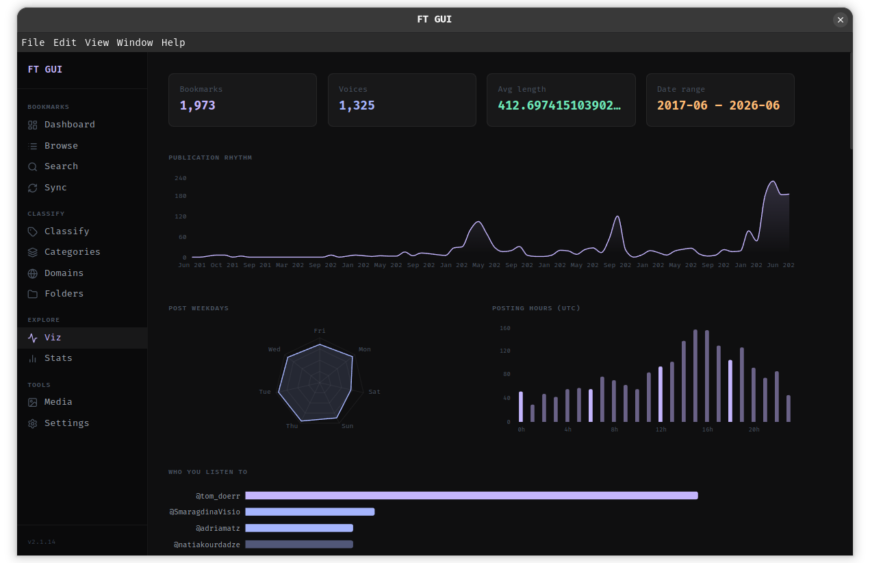
Twitter bookmarks are where good ideas go to die. You save a thread on distributed systems, a new AI paper, a clever CSS trick — and three months later it’s buried under five hundred other saves in a flat, unsearchable list with no folders (unless you’re paying), no export, and no memory.
FT GUI turns that backlog into a local desktop application: a searchable, classifiable, deletable library that lives entirely on your machine. It’s built on top of the excellent open-source fieldtheory-cli by @afar1 — which we’ve extended with a full Electron desktop app, bulk delete from X, reset classification, and an interactive viz dashboard.
Version 2.1.2. Free. Open source. Linux, macOS, and Windows.
Table of Contents
- Introduction: Your Bookmarks Deserve Better
- Can You Download Your Twitter Bookmarks?
- What is FT GUI?
- How It Works Under the Hood
- Getting Started: Install and First Sync
- Core Features
- Where Are My Saved Bookmarks on Twitter?
- How to Export All Your Twitter Bookmarks
- How to Delete Twitter Bookmarks in Bulk
- Scheduling Automatic Syncs
- Is FT GUI Safe to Use?
- Frequently Asked Questions
- Conclusion
1. Introduction: Your Bookmarks Deserve Better
The internet moves faster than ever, and X is still the primary firehose for real-time information. But as a twitter bookmarks manager, the native app is fundamentally broken.
Unless you pay for X Premium, you don’t get folder organization. Even then, the search function within bookmarks is notoriously unreliable. There’s no way to export your list, no way to run complex queries, and no way to access your saved knowledge offline. People use bookmarks to build a second brain — and the platform gives them a tool with no memory.
FT GUI was built to fix that. It takes your X bookmarks and puts them in a local desktop app where you can actually use them.
2. Can You Download Your Twitter Bookmarks?
Yes — but not through X’s official tools.
If you’ve ever tried using X’s “Download an archive of your data” in Settings, you’ve noticed the disappointing truth: the export includes your tweets, likes, and DMs, but not your bookmarks. As of writing, X has never included bookmarks in the data archive. There’s no native export button anywhere on the platform.
To download your Twitter bookmarks, you need a third-party tool. There are paid SaaS options, but FT GUI is free and uses your existing browser session — no API key, no developer account, no monthly fee.
The answer to “can you download your Twitter bookmarks?” is: yes, and this is the best free way to do it.
3. What is FT GUI?
FT GUI is a desktop application and CLI for self-custody of your X/Twitter bookmarks. It’s the v2.0.0 evolution of fieldtheory-cli, the original open-source twitter bookmarks exporter by @afar1.
Available as:
.AppImageand.debfor Linux.dmgfor macOS.exeinstaller for Windowsnpm install -g fieldtheoryfor the CLI
What it does:
- Syncs all your bookmarks locally via your browser session — no API key required
- Full-text BM25 search across tweet text, author handles, and extracted article content
- LLM-powered classification into categories and subject domains
- Interactive Recharts dashboard (14 panels)
- Bulk delete from X while keeping your local copy
- Reset and re-run classification on any subset of bookmarks
The CLI is unchanged and fully intact. The GUI is additive — everything the CLI does, the GUI surfaces in a desktop interface.
4. How It Works Under the Hood
Most tools that interact with X require a developer account and API access. FT GUI takes a different approach.
Browser Session Extraction
When you click Sync, the app reads your local browser database — Chrome, Firefox, Brave, Edge, or Chromium — to extract your active X session token. This is the exact same token your browser uses when you’re logged in. It reads it from your local disk; nothing is sent to any server other than X itself.
The session cookie is used only for the sync request and then discarded. It is never stored to any file.
X’s Internal GraphQL API
Instead of the official X developer API (which requires paid access for bookmark reads), FT GUI calls X’s internal GraphQL API — the same one that powers the Twitter web app when you scroll through your bookmarks in a browser. No API key needed, no developer account required.
For cross-platform use where browser session extraction isn’t possible, an OAuth fallback is available: ft auth + ft sync --api. This uses the official v2 API and works on all platforms without a browser running.
Local Data Pipeline
Every synced bookmark is written to bookmarks.jsonl — one JSON record per line, stored at ~/.fieldtheory/bookmarks/. This is the source of truth. From it, a SQLite FTS5 index is built at bookmarks.db for full-text search. Sync state is tracked in bookmarks-meta.json.
Nothing leaves your machine. The only outbound connections are to X’s API during sync.
5. Getting Started: Install and First Sync

Requirements: Node.js 20+ (for CLI). Chrome, Firefox, Brave, or Edge logged into X.
Desktop app
Download the latest release from github.com/k0d3d/ft-gui/releases for your platform, or build from source:
git clone https://github.com/k0d3d/ft-gui
cd ft-gui
pnpm install
pnpm gui:pack    # → release/FT-GUI.AppImage + FT-GUI.deb
pnpm gui:start   # launch
On Linux, if the app doesn’t start, run it with --no-sandbox or consult the Linux platform notes.
CLI
npm install -g fieldtheory

ft sync              # pull your bookmarks
ft search "topic"   # search them
ft viz               # terminal dashboard
ft categories        # see what you've been saving
First sync can take 1–5 minutes depending on your bookmark count. The app auto-detects your browser. Once done, everything is in ~/.fieldtheory/bookmarks/ and the GUI’s Browse screen shows your full library.
6. Core Features
6.1 Full-Text Search
The Search screen (and ft search <query> in the CLI) uses SQLite FTS5 with BM25 relevance ranking — the same algorithm used by professional search engines. It searches across tweet text, author handles, and extracted article body text.
X’s native bookmark search only works within the X web app and is notoriously unreliable. This runs locally and returns results in milliseconds regardless of your library size.
6.2 LLM-Powered Classification
The Classify screen runs your bookmarks through an LLM — Claude, Codex, or any OpenAI-compatible API — and assigns each one a category and subject domain.
Built-in categories: tool, security, technique, launch, research, opinion, commerce. Subject domains are open-ended (the LLM decides based on content). The Classify screen shows two-phase progress: categories first, then domains.
For lightweight classification without an LLM, ft classify --regex applies pattern-matching rules against tweet text and linked domains.
6.3 Interactive Viz Dashboard
The original ft viz terminal dashboard is now a full interactive Recharts GUI. The Viz screen has 14 panels:
- Publication rhythm (area chart of monthly cadence)
- Post weekdays (radar chart)
- Posting hours UTC (bar chart)
- Who you listen to (top 20 authors)
- Where links lead (top domains)
- Categories and subject domains (horizontal bars)
- Composition (media %, links %, text-only %)
- Time capsules (oldest bookmark per year)
- Hidden gems (one-time authors with long, substantive text)
- Rising voices (new authors from the latest month)
The terminal version still works for headless/cron use.
6.4 Bulk Delete from X

This is one of the most-requested features that X never built natively.
In the Browse screen, switch to Select mode, pick any number of bookmarks, and click “Remove from X.” The app sends a DeleteBookmark mutation to X’s internal API for each selected tweet — rate-limited at 250ms per request to stay within X’s limits — and shows a live counter as it works.
Your local copy is always kept. This is un-bookmarking on X, not deletion from your local library. It’s designed for the “inbox zero” workflow: sync all your bookmarks, process them, then clear the queue from X.
The Sync screen has a “Remove from X after sync” checkbox that automates this: once a sync run completes, the newly synced bookmarks are automatically removed from X.
6.5 Reset Classification
If you run a new LLM engine, change your classification strategy, or want a fresh pass over a subset of bookmarks, Reset Classification marks them as unclassified without touching their text or metadata. The next classify run re-processes them from scratch.
Available three ways: multi-select in Browse, single-bookmark in the Detail view, or “Reset all classifications first” in the Classify screen before starting a new run.
6.6 Agent Integration
Because all data is local and the CLI is fast, any AI agent with shell access can query your bookmarks. Install the skill:
ft skill install # auto-detects Claude Code and Codex
Then ask your agent:
“What have I bookmarked about Postgres performance optimization?”
“I saved several open-source AI memory tools. Find the best one and explain how to integrate it into this repo.”
“Every morning, sync new X bookmarks and classify them.”
Your bookmark library becomes a queryable second brain that agents can search, reason over, and reference in code suggestions.
6.7 Local-First Storage
All data lives at ~/.fieldtheory/bookmarks/. No cloud account, no subscription, no telemetry. The bookmarks.jsonl file is the canonical source — the SQLite index is rebuilt from it at any time with ft index.
To delete everything cleanly: rm -rf ~/.fieldtheory/bookmarks. That’s it. No account to deactivate, no data to request deletion of.
7. Where Are My Saved Bookmarks on Twitter?
On the web, your bookmarks live at x.com/i/bookmarks — accessible from the left sidebar. They are stored server-side on X’s infrastructure, not on your device.
You cannot access them via X’s data archive download. If X goes down, or you lose account access, those bookmarks are inaccessible.
With FT GUI, a local mirror is maintained at ~/.fieldtheory/bookmarks/bookmarks.jsonl. You control the data. Browse it in the GUI’s Browse screen or filter it with ft list in the CLI — by author, category, domain, date range, or X bookmark folder.
8. How to Export All Your Twitter Bookmarks
How do I export all my bookmarks? This is one of the most common questions from power users, and X provides no native answer.
With FT GUI, the process is:
# Full sync — fetches your entire history, not just recent bookmarks
ft sync --rebuild

# The output is at:
# ~/.fieldtheory/bookmarks/bookmarks.jsonl
The bookmarks.jsonl format is a standard JSON Lines file — one JSON record per line. From there:
- Google Sheets / Excel: use a JSON-to-CSV converter or a script
- Notion: import via the CSV route, or use the JSONL directly with the Notion API
- Custom RAG pipeline: feed the JSONL directly to your embedding pipeline
- Backup: just copy the file to another machine or drive
Use FT_DATA_DIR to write the data to a specific path:
export FT_DATA_DIR=/path/to/export/directory
ft sync --rebuild
As a twitter bookmarks exporter, this is currently the most complete free option for X. You get the full tweet text, author, timestamps, linked article content, quoted tweets, and engagement counts for every bookmark in your history.
9. How to Delete Twitter Bookmarks in Bulk
X has no native bulk delete. The only way to remove bookmarks natively is to open each one and tap the bookmark icon individually — painful at scale.
FT GUI’s Bulk Delete feature solves this with a multi-select UI:
- Open the Browse screen
- Click “Select” in the toolbar
- Check individual bookmarks, or “Select all on page”
- Click “Remove from X”
A progress counter shows the operation in real time. The rate limiter (250ms between requests) keeps you within X’s limits even for large selections.
The “inbox zero” workflow:
Enable “Remove from X after sync” in the Sync screen. Every sync run will automatically un-bookmark the newly synced items from X once they’re safely stored locally. Your X bookmark list stays clean; your local library grows.
This turns X bookmarks into a processing queue — save anything you want to capture, let FT GUI pull it locally, then clear the queue automatically.
10. Scheduling Automatic Syncs
You don’t need to run sync manually. Set up a cron job:
# Sync every morning at 7am
0 7 * * * ft sync

# Sync and classify every morning
0 7 * * * ft sync --classify
Combined with the agent skill, this becomes a fully automated personal knowledge pipeline. New bookmarks are synced, classified, and made available to your AI agent every morning — without touching anything.
On macOS, ft possible nightly install sets up a LaunchAgent for nightly “Possible” runs — cross-referencing your bookmark seeds against code repos to generate scored project ideas on a 2×2 grid.
11. Is FT GUI Safe to Use?
Anytime a tool reads your browser cookies, you should be cautious. Here is the full picture:
What the app reads: Your browser’s local cookie database on disk, to extract your X session token.
What it does with it: Uses it for the sync (and optionally delete) request to X’s API, then discards it. The session token is never written to any file on your machine.
What goes over the network: Requests go only to X’s API (x.com). No data is sent to any third-party server. No telemetry, no analytics, nothing phoned home.
The GUI is isolated: The Electron renderer process runs with full context isolation — it has no direct Node.js or file system access. All data operations happen in the sandboxed main process.
OAuth tokens (if you use the API mode) are stored with chmod 600 — owner-only permissions.
It’s open source. Every line of session extraction and delete logic is auditable at github.com/k0d3d/ft-gui (GUI) and github.com/afar1/fieldtheory-cli (original CLI). If you’re security-conscious, read src/chrome-cookies.ts and src/bookmark-delete.ts before running.
12. Frequently Asked Questions
Can you download your Twitter bookmarks? Yes. FT GUI reads your browser session and syncs all bookmarks to a local JSONL file. No API key required. The official X data export does not include bookmarks.
Is there a desktop app for Twitter bookmarks? FT GUI is exactly that — a free, open-source Electron desktop app available as AppImage/deb for Linux, dmg for macOS, and an exe installer for Windows.
How do I delete all my Twitter bookmarks at once? Use the Browse screen’s multi-select mode and click “Remove from X.” Or enable “Remove from X after sync” to automate it after every sync run. Your local copy is always kept.
Where are my saved bookmarks on Twitter? They live server-side at x.com/i/bookmarks. FT GUI mirrors them to ~/.fieldtheory/bookmarks/bookmarks.jsonl — a local copy you control.
How do I export all my bookmarks from X? Run ft sync --rebuild to fetch your full history, then copy ~/.fieldtheory/bookmarks/bookmarks.jsonl wherever you need it. It’s standard JSON Lines, compatible with any tool.
Does it require an X/Twitter API key? No. The default sync uses X’s internal GraphQL API via your browser session. OAuth mode (ft auth + ft sync --api) is available as a fallback for platforms without browser session access.
Does it work on Windows and Linux? Yes to both. The desktop app (AppImage, deb, exe) runs natively on all three platforms. Session sync via browser works on Linux and Windows with Chrome, Firefox, Brave, and Edge.
Is FT GUI free? Yes. It’s fully open source under the MIT license. No subscription, no account, no telemetry.
13. Conclusion
Your X bookmarks are more valuable than the platform lets you treat them. Every time you hit Save, you’re building a personal knowledge base — and X gives you a locked, unsearchable silo in return.
FT GUI turns that into a local desktop library: synced automatically, searchable in milliseconds, classified by an LLM, and manageable as an actual inbox — with bulk delete so the queue never grows unbounded. And now with snapshots, you can checkpoint your library before any destructive operation and restore it in seconds.
It’s free, open source, and built on top of fieldtheory-cli by @afar1. The CLI works exactly as it always has. The GUI is an addition, not a replacement.
Download the latest release from the FT GUI repo, or install the CLI with npm install -g fieldtheory. Star either repo if it’s useful:
github.com/k0d3d/ft-gui — desktop app (AppImage, deb, dmg, exe)
github.com/afar1/fieldtheory-cli — original CLI by @afar1